
Free
Send to every selected, ready provider in parallel. The fastest way to compare independent answers.
You → selected AIs
Open-source · v0.3.0 · Chrome 114+
Coordinate ChatGPT, Claude, Gemini, and Grok from one focused Side Panel. Multi-AI Chat uses the tabs you are already signed into: no model API keys and no separate chat backend.
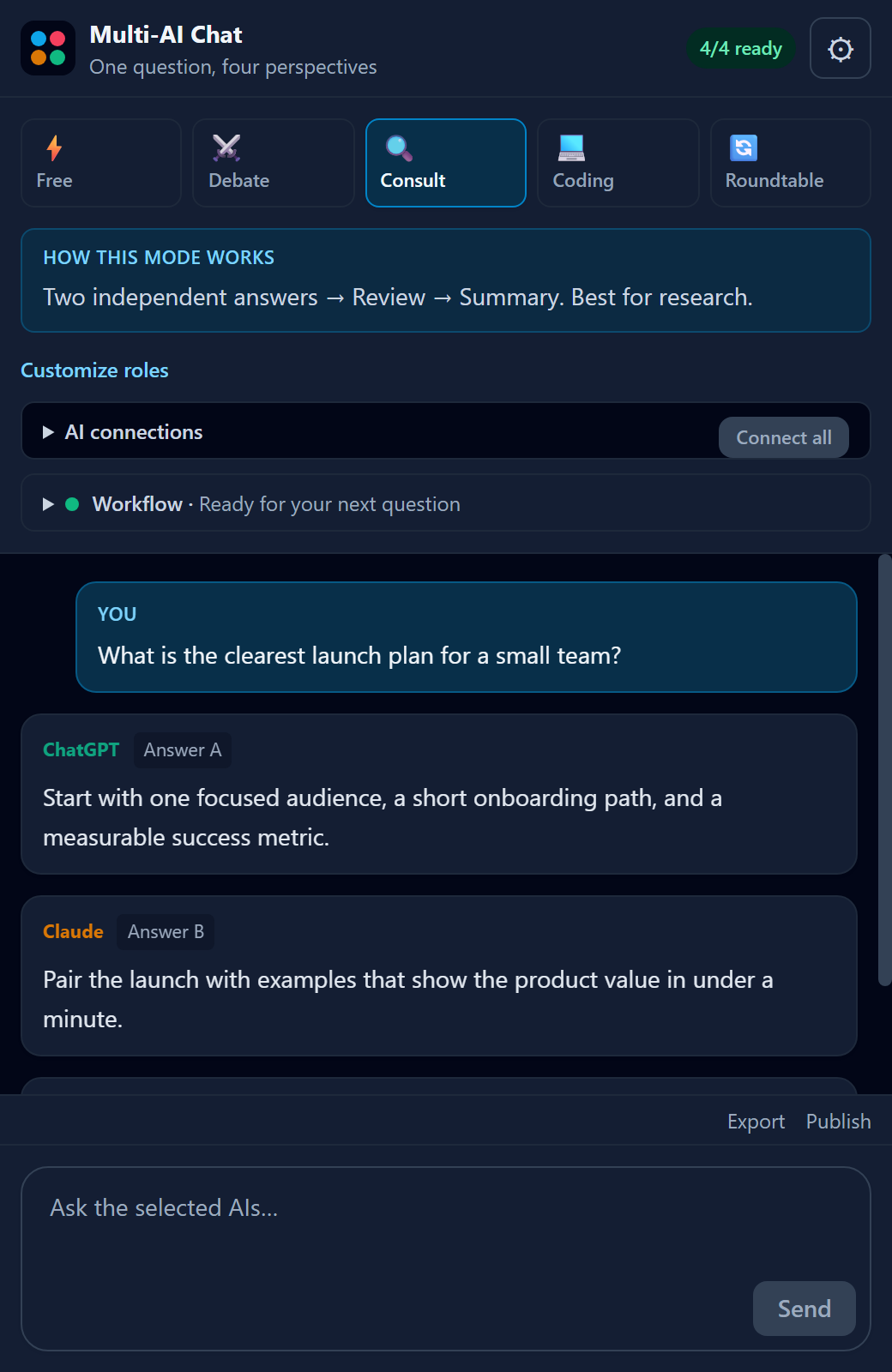
Five ways to think
Compare answers in parallel or let the models challenge, review, and refine one another in a structured sequence.
Send to every selected, ready provider in parallel. The fastest way to compare independent answers.
Assign opposing positions, ask a judge to weigh them, then synthesize the strongest result.
Gather two independent answers, have another AI review them, then produce one final response.
An eight-step loop for specification, review, implementation, testing, revision, and acceptance.
Four AIs build on the shared discussion across five rounds (twenty contributions in total).
Five modes
Free sends one question to every provider you picked that is already Ready.
New chats start on Free
Free sends one question to every provider you picked that is already Ready.
新對話從自由分送開始
自由分送把同一個問題,同時送給你勾了、而且已經 Ready 的 provider。
新しい会話は自由送信
自由送信は、選んでいて、すでに Ready の provider へ、同じ質問を一度に送ります。
Neue Chats starten auf Frei
Frei schickt dieselbe Frage auf einmal an jeden Provider, den du gewählt hast und der schon Ready ist.
새 대화는 자유 전송
자유 전송은 골라 두었고 이미 Ready 인 provider 에게 같은 질문을 한 번에 보냅니다.
Your question
Every mode begins with this same sentence.
Pick a mode
The other four modes do not send at once. They pass the work from one role to the next.
你的問題
哪個模式都從這同一句出發。
挑一個模式
另外四個模式不一起送,而是一個角色接一個角色。
あなたの質問
どのモードも、この一文から始まります。
モードを選ぶ
残りの四つは一度に送りません。役割から役割へ、作業を順に渡します。
Deine Frage
Jeder Modus beginnt mit diesem einen Satz.
Modus wählen
Die anderen vier Modi senden nicht auf einmal. Sie geben die Arbeit von einer Rolle zur nächsten.
당신의 질문
어느 모드든 이 한 문장에서 시작합니다.
모드를 고른다
나머지 네 모드는 한 번에 보내지 않습니다. 역할에서 역할로 일을 넘깁니다.
Built for the imperfect web
If a provider fails during Roundtable, the run pauses and gives you three explicit choices.
Roundtable
Roundtable asks only when a provider reports an error.
A failed turn waits
Roundtable asks only when a provider reports an error.
這一棒失敗先等你
道理辯證會問你,是在 provider 回報錯誤的時候。
失敗した発言は待つ
円卓討論が尋ねるのは、provider がエラーを返したときです。
Eine fehlgeschlagene Runde wartet
Der Rundtisch fragt nur, wenn ein Provider einen Fehler meldet.
실패한 발언은 기다린다
원탁 토론이 묻는 것은 provider 가 오류를 알릴 때입니다.
Retry
It resets that provider, then sends a new request ID.
Skip turn
The next turn sees a fixed placeholder, not the error text.
Cancel
The run stops, and replies still in flight are dropped.
Panel waits
Nothing moves on until you choose.
重試
先把那個 provider 清乾淨,再換一個新的 request ID。
略過這棒
下一棒看到的是固定佔位句,不是 provider 的錯誤原文。
取消
這次執行停掉,還沒回來的回覆也不算數。
面板在等
你還沒選,後面就不會動。
再試行
その provider を片付けてから、新しい request ID で送り直します。
この発言を飛ばす
次の発言に渡すのは決まったプレースホルダーで、エラー文そのものは渡しません。
中止
この実行は止まり、まだ戻っていない返信も数えません。
パネルが待つ
選ぶまで、先には進みません。
Nochmal
Der Provider wird zurückgesetzt, dann geht eine neue Request ID raus.
Runde überspringen
Die nächste Runde sieht einen festen Platzhalter, nicht den Fehlertext.
Abbrechen
Der Lauf stoppt, und Antworten, die noch unterwegs sind, zählen nicht.
Das Panel wartet
Weiter geht es erst, wenn du dich entscheidest.
다시 시도
그 provider 를 정리한 뒤, 새 request ID 로 다시 보냅니다.
이 발언을 건너뛴다
다음 발언이 보는 것은 고정된 자리표시이고, provider 의 오류 문장이 아닙니다.
취소
이번 실행은 멈추고, 아직 돌아오지 않은 답도 치지 않습니다.
패널이 기다린다
고르기 전에는 앞으로 가지 않습니다.
Small panel, deliberate engineering
Provider tabs are rediscovered after service-worker restarts, and packaged content scripts are repaired when needed.
Each request has its own ID, so a late answer cannot complete the wrong step or a later workflow.
A provider becomes Ready only after its composer confirms that the signed-in page can accept input.
Settings and up to 30 conversations stay in Chrome. Follow up, start fresh, or remove the extension to delete its storage.
Request path
The Side Panel only talks to background.js. The content script types into the provider page you already have open.
Typed here, answered there
The Side Panel only talks to background.js. The content script types into the provider page you already have open.
在這裡打,在那邊答
側邊面板只跟 background.js 說話。內容腳本再把字打進你已經開著的 provider 頁面。
ここで打って、向こうで答える
サイドパネルが話す相手は background.js だけです。内容スクリプトが、すでに開いている provider のページへ文字を打ちます。
Hier tippen, dort antworten
Das Side Panel redet nur mit background.js. Das Inhaltsskript tippt in die Providerseite, die du schon offen hast.
여기서 치고, 저기서 답한다
사이드 패널이 말하는 상대는 background.js 뿐입니다. 콘텐츠 스크립트가 이미 열어 둔 provider 페이지에 글을 칩니다.
Side Panel
You type the question here. This panel does not call a provider itself.
Service worker
background.js passes it on and waits for that request ID.
Content script
It fills the composer on the page and reads the reply that appears.
Provider page
ChatGPT, Claude, Gemini, or Grok receives it as a normal typed prompt.
側邊面板
問題在這裡打。這個面板自己不聯絡 provider。
背景服務
background.js 把問題送出去,並等那個 request ID 回來。
內容腳本
它把字填進頁面上的輸入框,再把出現的回覆讀回來。
供應商頁
ChatGPT、Claude、Gemini 或 Grok 收到的,就像你自己打上去的一樣。
サイドパネル
質問はここで打ちます。このパネル自身は provider を呼びません。
背景処理
background.js が質問を渡し、その request ID が戻るのを待ちます。
内容スクリプト
ページの入力欄に文字を入れ、現れた返信を読み取ります。
提供元のページ
ChatGPT、Claude、Gemini、Grok は、自分で打った文として受け取ります。
Side Panel
Die Frage tippst du hier. Dieses Panel ruft selbst keinen Provider auf.
Service Worker
background.js gibt sie weiter und wartet auf diese Request ID.
Inhaltsskript
Es füllt das Eingabefeld auf der Seite und liest die Antwort, die dort erscheint.
Providerseite
ChatGPT, Claude, Gemini oder Grok bekommt sie wie einen normal getippten Text.
사이드 패널
질문은 여기서 칩니다. 이 패널 자체는 provider 를 부르지 않습니다.
서비스 워커
background.js 가 질문을 넘기고, 그 request ID 가 돌아오기를 기다립니다.
콘텐츠 스크립트
페이지의 입력칸에 글을 넣고, 거기에 나타난 답을 읽어 옵니다.
제공자 페이지
ChatGPT, Claude, Gemini, Grok 은 직접 친 글처럼 받습니다.
Request IDs
That ID keeps a late reply tied to the send that asked for it.
Only that ID can finish
That ID keeps a late reply tied to the send that asked for it.
對上 ID 才算完成
這個 ID 是要讓晚到的回覆還對得上當初那一次送出。
その ID だけが完了できる
この ID は、遅い返信を、それを頼んだ送信につなぎ止めるためのものです。
Nur diese ID darf fertig werden
Diese ID hält eine späte Antwort an dem Senden fest, das sie angefordert hat.
그 ID 만 끝낼 수 있다
이 ID 는 늦은 답을, 그것을 요청한 전송에 묶어 둡니다.
New send
Each send builds its ID from the workflow, the provider, and a random value.
Match the ID
This step ends only when the provider and the ID both match.
Drop the late one
If the ID is not the one this step is waiting on, the reply is ignored.
新的送出
每次送出時,ID 由 workflow、provider 和一段亂數組成。
核對 ID
provider 和 ID 都對上,這一步才結束。
晚到不算
ID 不是這一步在等的那組,這則回覆就當沒看到。
新しい送信
送信のたびに、workflow と provider と乱数から ID を作ります。
ID を照合
provider と ID の両方が合って、初めてこの段は終わります。
遅い返信は捨てる
ID がこの段の待ちと違うとき、その返信は見なかったことにします。
Neues Senden
Jedes Senden baut seine ID aus Workflow, Provider und einem Zufallswert.
ID vergleichen
Der Schritt endet nur, wenn Provider und ID beide stimmen.
Späte Antwort verwerfen
Stimmt die ID nicht mit der, auf die dieser Schritt wartet, wird die Antwort ignoriert.
새 전송
보낼 때마다 workflow, provider, 무작위 값으로 ID 를 만듭니다.
ID 를 맞춘다
provider 와 ID 가 둘 다 맞아야 이 단계가 끝납니다.
늦은 답은 버린다
ID 가 이 단계가 기다리는 것이 아니면, 그 답은 못 본 것으로 합니다.
Official Chrome Web Store release
The Chrome Web Store listing is v0.3.0 (updated 2026-09-23), and Chrome updates it automatically. Chrome rolls updates out gradually, so a given user may not have v0.3.0 yet. The versioned ZIP below is the same release, for manual installation.
Open the official listing and choose Add to Chrome.
Get it from the Chrome Web Store →New in v0.3.0: experimental Meta AI standby, off by default.
Pin Multi-AI Chat, open the Side Panel, then open and sign in to each provider once. When a composer is detected, that provider shows Ready.
Need the versioned files? Download the v0.3.0 ZIP and checksum, verify and extract it, then enable Developer mode at chrome://extensions and choose Load unpacked. That ZIP is the manual install for the same v0.3.0 release the store lists.
SHA-256
d7e976872d2e19cf8867ea7562c263d7de31f175e706ea44b67a204db3233d80
Windows PowerShell
(Get-FileHash .\multi-ai-chat-store-v0.3.0.zip -Algorithm SHA256).Hash.ToLower()macOS / Linux
shasum -a 256 multi-ai-chat-store-v0.3.0.zipRequires Chrome 114+, Node.js 22.18+, npm, and Git. After the build, load the generated dist/ folder.
git clone https://github.com/TED-H-com/multi-ai-chat.git
cd multi-ai-chat
npm ci
npm run verifyFirst run
Each provider has to pass one check before it shows Ready.
Ready needs the composer
Each provider has to pass one check before it shows Ready.
看得到輸入框才 Ready
每個 provider 都要過一關,才會顯示 Ready。
入力欄があって Ready
provider ごとに確認を一つ通ってから、Ready になります。
Ready braucht das Eingabefeld
Jeder Provider muss eine Prüfung bestehen, bevor er Ready zeigt.
입력칸이 있어야 Ready
provider 마다 확인을 하나 통과해야 Ready 가 됩니다.
Install v0.3.0
Use the Chrome Web Store, or load that same release ZIP unpacked.
Open the panel
The extension's toolbar button opens it.
Check composer
The content script looks for a composer that can take input.
Shows Ready
Then that provider is marked Ready, and Free can send to it.
裝這版
可以從 Chrome 線上應用程式商店裝,或把同一版 ZIP 解開後載入。
打開面板
點擴充功能的工具列按鈕就會開。
看輸入框
內容腳本要找到一個能打字的輸入框。
顯示 Ready
這時 provider 才標成 Ready,自由分送也才會送給它。
v0.3.0 を入れる
Chrome ウェブストアから入れるか、同じ版の ZIP を展開して読み込みます。
パネルを開く
拡張機能のツールバーボタンを押すと開きます。
入力欄を見る
内容スクリプトは、文字を受け付ける入力欄を探します。
Ready と出す
そこで provider が Ready になり、自由送信の送り先に入ります。
v0.3.0 installieren
Nimm den Chrome Web Store, oder lade dieselbe Release ZIP entpackt.
Panel öffnen
Der Knopf der Erweiterung in der Symbolleiste öffnet es.
Eingabefeld prüfen
Das Inhaltsskript sucht ein Eingabefeld, das Text annimmt.
Zeigt Ready
Dann wird der Provider als Ready markiert, und Frei kann an ihn senden.
v0.3.0 설치
Chrome 웹 스토어에서 설치하거나, 같은 판의 ZIP 을 풀어 불러옵니다.
패널을 연다
확장 프로그램의 도구 모음 버튼을 누르면 열립니다.
입력칸을 본다
콘텐츠 스크립트는 글을 받을 수 있는 입력칸을 찾습니다.
Ready 를 표시
그때 provider 가 Ready 로 표시되고, 자유 전송이 그쪽으로 보낼 수 있습니다.
Private by architecture
There is no Multi-AI Chat backend, analytics, tracking, advertising, or telemetry. Prompts go directly to the provider pages you select.
Read the full privacy policyInterface settings, up to 30 conversations, and an optional HackMD token live in chrome.storage.local. Provider content scripts cannot read that token.
sidePanel, tabs, scripting, and storage; host access is limited to ChatGPT, Claude, Gemini, Grok, and (only when you publish) api.hackmd.io. meta.ai is requested only after you activate Meta.
The prompts you send to selected providers, plus the current conversation and your own token only if you explicitly publish to HackMD. Nothing is sent to the developer.
Trust line
A prompt leaves only for a provider you selected, or for HackMD after you publish.
Chats stay in Chrome
A prompt leaves only for a provider you selected, or for HackMD after you publish.
對話留在這台 Chrome
問題只會送到你選的 provider,或是你按了發布之後的 HackMD。
会話はこの Chrome に残る
質問が出て行く先は、選んだ provider か、公開したあとの HackMD だけです。
Chats bleiben in Chrome
Eine Frage geht nur an einen Provider, den du gewählt hast, oder an HackMD, nachdem du veröffentlichst.
대화는 이 Chrome 에 남는다
질문이 나가는 곳은, 고른 provider 이거나, 게시한 뒤의 HackMD 뿐입니다.
Side Panel
You read and type on this extension page.
Service worker
It delivers the prompt only to the provider tabs you picked.
Provider page
That site gets the prompt as if you had typed it there.
HackMD
api.hackmd.io is called only after you choose Publish, with your token.
側邊面板
閱讀和打字都在這個擴充頁面上。
背景服務
它只把問題送到你點選的那些 provider 分頁。
供應商頁
那一站收到的內容,就像你親自打上去的。
HackMD
api.hackmd.io 只在你按發布之後,才會用你的 token 呼叫。
サイドパネル
読むのも打つのも、この拡張機能のページです。
背景処理
選んだ provider のタブにだけ質問を届けます。
提供元のページ
そのサイトが受け取る文は、自分で打ったものと同じです。
HackMD
api.hackmd.io を呼ぶのは、公開を選んだあとで、あなたの token を使います。
Side Panel
Lesen und Tippen passiert auf dieser Erweiterungsseite.
Service Worker
Er liefert die Frage nur an die Provider Tabs, die du gewählt hast.
Providerseite
Die Seite bekommt den Text so, als hättest du ihn dort getippt.
HackMD
api.hackmd.io wird erst nach Veröffentlichen aufgerufen, mit deinem Token.
사이드 패널
읽고 치는 곳은 이 확장 프로그램 페이지입니다.
서비스 워커
고른 provider 탭에만 질문을 전달합니다.
제공자 페이지
그 사이트가 받는 글은, 거기서 직접 친 것과 같습니다.
HackMD
api.hackmd.io 는 게시를 고른 뒤에만, 당신의 token 으로 부릅니다.
Need a dedicated workspace?
Choose the desktop edition for isolated provider profiles, focused live WebViews, snapshots, replay, checkpoints, and local-file workflows.