For your next event recap從下一份活動回顧開始

Turn comments into a recap with sources.

把留言與字幕,整理成有來源的回顧。

Have event feedback to review or a transcript to quote? Your AI assistant helps you make sense of it. MetaMuse keeps the originals, finds matching passages, and saves your draft with its citations.

活動後的留言想整理?影片裡的一段話想引用?讓你慣用的 AI 助理幫忙判讀與撰寫,MetaMuse 負責保存原文、搜尋段落,把草稿與引用一起留下。

Runs on your computer在你的電腦上操作No account needed for the example範例不需要帳號Alpha packageAlpha 試用版
Your first recap你的第一份回顧
Synthetic example · prewritten recap合成資料示範 · 預寫回顧
✓Import a post and two comments匯入一則貼文與兩則留言
✓Find the request for video subtitles找到「希望影片加上字幕」的留言
✓Keep the original comment as a citation保留原始留言作為引用
✓Open the recap as a Markdown file打開 Markdown,閱讀回顧與來源
A familiar task你可能也遇過

The event is over. The feedback is still scattered.

活動結束了,留言與影片還散在各處。

You want to know what people asked for, find a useful quote, and write a recap you can stand behind. Give your assistant permitted comments or local subtitles. MetaMuse keeps those sources available so you can check a draft against the original words.

想知道大家提了哪些需求、找出一段值得引用的話,再寫成一份能核對的回顧。把你有權使用的留言或本地字幕交給助理整理,MetaMuse 留下來源,讓你隨時回頭確認原文。

How it works

運作方式

From your files to a sourced draft

從你的資料,走到有來源的草稿

Bring a comment export or local subtitles. Find the passages you need, write with your assistant, then keep the draft and its sources together.

帶入留言匯出檔或本地字幕,找出需要的原文,和 AI 助理一起寫,再把草稿與引用一起留下。

  1. Comment exports

    Posts and comments you may use.

  2. Video subtitles

    Local SRT or VTT files.

  3. Find the originals

    Search words and keep exact sources.

  4. Write together

    Your connected assistant helps you write.

  5. Keep the draft

    Review and export Markdown or text.

  • Choose your files
  • Check the original passages
  • Keep a draft you can review
Workflow illustration. Writing uses your own assistant; the local demo uses a prewritten recap and makes no AI call.
  1. 留言匯出檔

    你有權使用的貼文與留言。

  2. 影片字幕

    本地 SRT 或 VTT 檔案。

  3. 找到可引用原文

    用關鍵字搜尋,保留原文與來源。

  4. 你與 AI 一起寫

    讓已連接的 AI 助理判讀與撰寫。

  5. 保存有來源的草稿

    預覽後匯出 Markdown 或文字。

  • 選好要匯入的檔案
  • 核對引用的原文
  • 留下可以回頭核對的草稿
流程示意。撰寫使用你自己的 AI 助理;本地範例使用預寫回顧,沒有呼叫 AI。
When it helps適合拿來做什麼

Less hunting for the original. More time for the recap.

少一點翻找原文,多一點時間整理重點。

Start with local files. Add an assistant when you want help interpreting and writing.

先從本地檔案開始,需要判讀與撰寫時,再交給你的 AI 助理協助。

01

Review event feedback

整理活動回饋

Find comments about the next event, accessibility requests or missing materials. Your assistant can turn the selected evidence into a recap.

找出對下一場活動的建議、無障礙需求或索取講義的留言,再讓助理依選好的原文寫回顧。

02

Find a transcript passage

找回字幕段落

Import local SRT or VTT files and search for the words you want to quote.

匯入本地 SRT 或 VTT 字幕,用關鍵字找出想引用的段落。

03

Check where a claim came from

核對一句話的來源

Keep source references and exact text revisions alongside a draft, so you can compare the wording with the original.

將來源引用與原文版本連同草稿保存,需要時可以對照文字。

04

Use your usual AI assistant

接上慣用的 AI 助理

Connect through CLI or MCP. The assistant asks questions and writes; MetaMuse handles the local records.

透過 CLI 或 MCP 連接。助理負責提問與撰寫,MetaMuse 負責保存本地資料。

05

Ask Muse a follow-up

選擇向 Muse 追問

Muse needs separate setup and approval. Two real turns succeeded across candidate builds; use 0.1.0a2 or later for the tested fixes.

Muse 需要另外設定與授權。修正版已完成兩輪真實問答;請使用包含修正的 0.1.0a2 或後續版本。

06

Keep a file you can use

留下能接著使用的文件

Export Markdown, text, CSV, JSONL or a bundle for your own review and editing. Facebook Page text publishing is experimental and requires separate setup and your exact approval.

匯出 Markdown、文字、CSV、JSONL 或資料套件,方便後續閱讀與編輯。Facebook 粉專文字發文仍在實驗階段,需要另外設定,並由你核對批准。

Read it first. Then approve the post.

先看全文與粉專,再決定要不要發

If you want to publish, MetaMuse prepares the exact text and destination for your review. You approve that post before anything is sent.

想把草稿發到 Facebook 粉專時,先看這次要送出的全文與目的地。由你核對並批准,才會送出。

  1. Choose a draft

    Use the saved text you want to post.

  2. Read the preview

    Check the full text and destination.

  3. You approve

    Consent covers this exact post.

  4. Send and keep receipt

    Check the receipt; reconcile unclear results.

  • Choose the saved draft
  • Read the exact post
  • Approve before sending
  • On your computer
  • Your approval
  • Facebook Page
Requires your Page connection and token. One authorized real test post and read-only receipt reconciliation succeeded across corrected candidate builds. Use 0.1.0a2 or later for the read-back fix; uncertain results never resend.
  1. 選一份文字草稿

    選好這次要發布的草稿版本。

  2. 核對全文與粉專

    看清楚送出全文與目標粉專。

  3. 你批准這一次

    批准只涵蓋這次核對的內容。

  4. 發文並留下回執

    保存貼文回執,結果不明先查核。

  • 選擇已保存的草稿
  • 核對這次送出的全文
  • 批准後才送出
  • 在你的電腦上
  • 由你批准
  • Facebook 粉專
需要先設定你的粉專連線與權杖。一篇獲准的真實測試貼文已完成只讀對帳;測試過程曾更換修正版,請使用包含讀回修正的 0.1.0a2 或後續版本。送達不明時不重送。
See the output看看實際輸出

Search, draft, export. In the real CLI.

搜尋、草稿、匯出,實際畫面在這裡。

These are real terminal captures from a separate synthetic walkthrough, including fixture Muse replies. Each image links to a readable transcript. They demonstrate the workflow, not real-account results.

這些是真實終端機截圖,來自另一份包含 fixture Muse 回覆的合成資料範例。每張都有純文字紀錄可閱讀,用來展示流程,不代表真實帳號的執行結果。
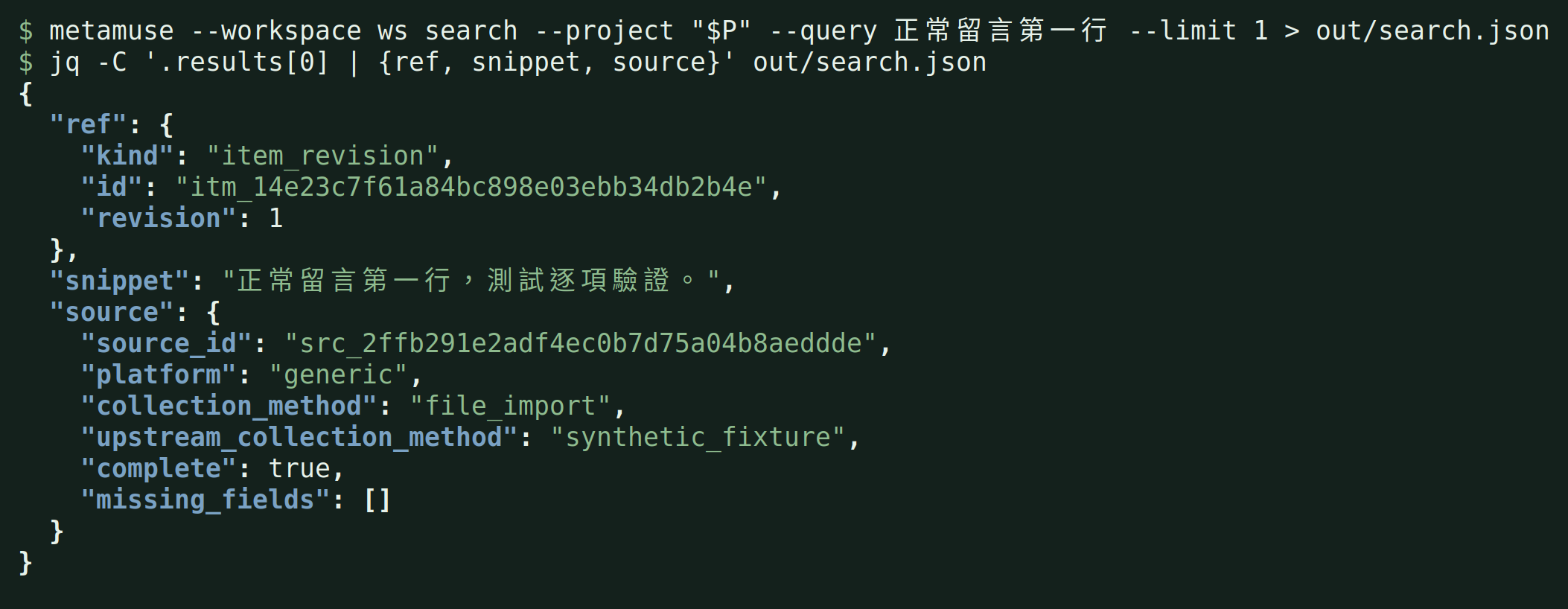
Search hit with an exact item revision, Chinese snippet and source labels.
One hit cites its exact item revision. Its source labels remain file_import and synthetic_fixture. Read transcript.一筆命中引用精確項目版本。來源標籤維持 file_import 與 synthetic_fixture。閱讀純文字紀錄。
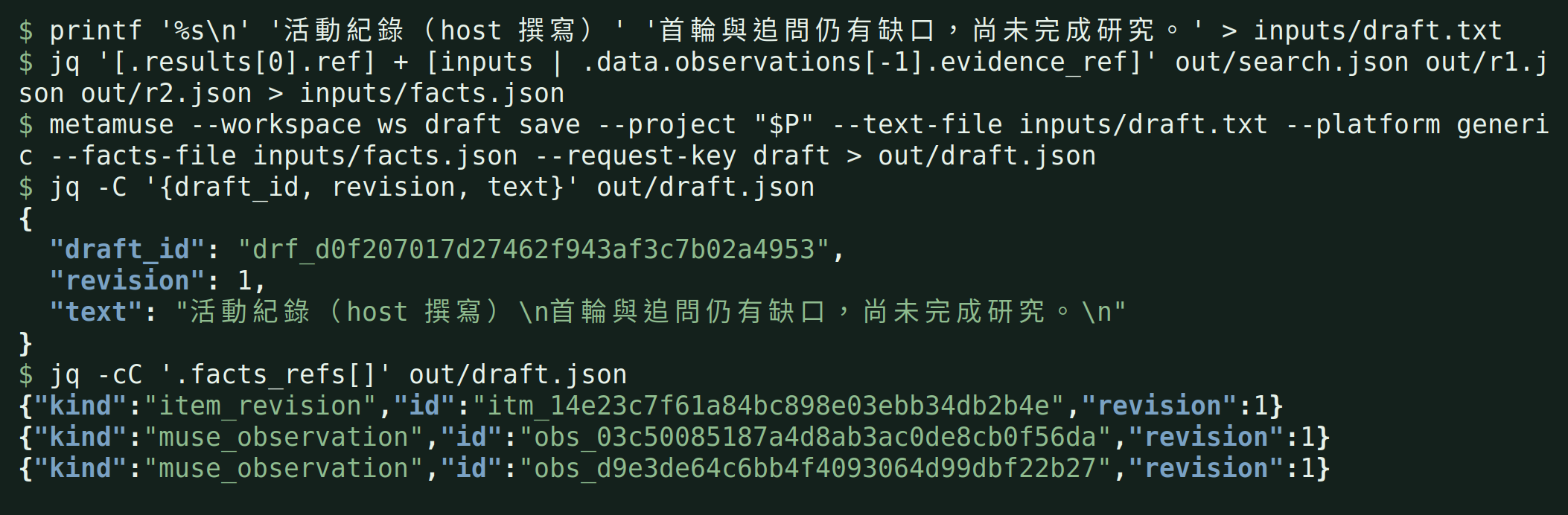
Host-written draft citing the item and two Muse observations
The host saves its own text with the item revision and observations from both fixture exchanges. No generation call. Read transcript.主代理保存自行撰寫的文字,引用項目版本與兩輪 fixture 討論的觀察。沒有呼叫生成模型。閱讀純文字紀錄。
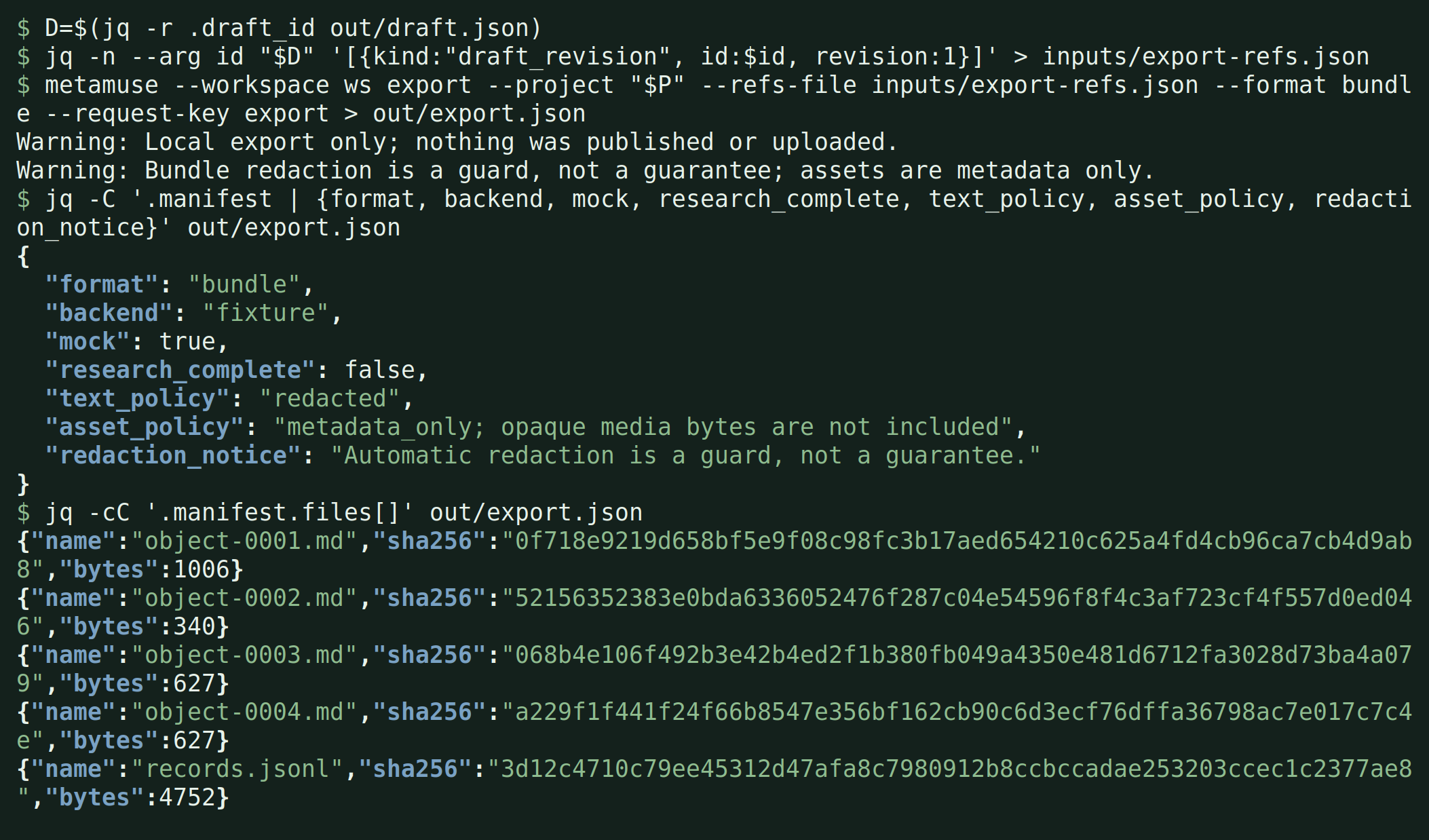
Local bundle manifest, fixture labels and no-publication warnings
The local bundle manifest lists file hashes and retains the fixture labels. Stderr says nothing was published or uploaded, and redaction is a guard. Read transcript.本地套件清單列出檔案雜湊並保留 fixture 標記。stderr 寫明沒有發布或上傳,遮蔽只是一道防護。閱讀純文字紀錄。
With your assistant與你的助理一起使用

Your assistant writes. You can check the sources.

助理幫你寫,你查得到來源。

Install MetaMuse locally, then give an assistant access through CLI or MCP. The Skill explains how to use the connected tools.

先在本地安裝 MetaMuse,再讓助理透過 CLI 或 MCP 使用工具。Skill 提供已連接工具的操作說明。

Your files你的檔案Comments and subtitles留言與字幕
MetaMuseMetaMuseSearch and source references搜尋與來源引用
Your assistant你的助理Interpret and write判讀與撰寫
Your recap你的回顧Review and export核對並匯出
Before you start開始之前

A few practical questions.

幾個你可能想問的問題。

The first example uses local synthetic files, so you can see the result before connecting accounts or an assistant.

第一個範例只用本地合成檔案,先看到結果,再決定是否連接帳號或 AI 助理。

01

Do I need a Muse account?

一定要有 Muse 帳號嗎?

No account is needed for local import, search, drafts or exports. Muse is a separately configured, optional discussion partner.

本地匯入、搜尋、草稿與匯出不需要帳號。Muse 是需要另外設定的選用討論對象。

02

Will the example write with AI?

範例會直接用 AI 寫回顧嗎?

It saves a clearly labelled prewritten recap. For your own work, connect an AI assistant or provide the text yourself.

範例保存的是清楚標記的預寫回顧。處理自己的資料時,可以連接 AI 助理,或自行提供文字。

03

Can I paste a Facebook or video URL?

可以直接貼 Facebook 或影片網址嗎?

Remote collectors need their own setup and operator approval. They currently have synthetic tests, with real-account LIVE validation pending. Start with local files.

遠端收集需要各自的設定與操作者授權。目前已有合成資料測試,真實帳號 LIVE 驗證仍待完成。建議先從本地檔案開始。

04

Is this a web app?

這是網頁版工具嗎?

This page introduces a tool you install on your computer. Use it through a terminal or connect it to your AI assistant. The example below shows you how to start.

這裡是介紹頁。先把工具安裝在你的電腦上,再透過終端機或已連接的 AI 助理操作。下方的範例會帶你開始。

Try it on your computer在你的電腦上試試

Open your first sourced recap.

打開你的第一份有來源回顧。

Install uv, then run these two commands to try the alpha. Installation downloads Python and dependencies; the demo needs no account or AI service.

先安裝 uv,再執行這兩行指令,就能試用 alpha 版。安裝會下載 Python 與依賴;範例不需要帳號或 AI 服務。

Install the command

安裝指令

uv downloads the alpha package from PyPI and creates an isolated environment for the command.

uv 會從 PyPI 下載 alpha 套件,並為指令建立獨立的安裝環境。

uv tool install --python 3.12.13 'metamuse-cli==0.1.0a2'

Run the bundled example

跑內附範例

Import synthetic comments, find the subtitle request, and export Markdown. Open the .md files in the printed Export directory. Each run keeps a new local workspace.

匯入合成留言、找到字幕需求並匯出 Markdown。打開終端機顯示的 Export directory 裡的 .md 檔。每次執行都保留獨立的本地工作區。

metamuse demo
What you can do today現在能拿來做什麼

Find the original. Keep a draft you can check.

找到原文,留下能核對的草稿。

Start with local files to search, save drafts and export. The fixes in 0.1.0a2 were tested in bounded real Muse and Page-post receipt journeys across candidate builds. Facebook collection and remote media are not yet verified with real accounts.

先用本地檔案搜尋、保存草稿與匯出。0.1.0a2 包含已完成有界真實 Muse 測試與粉專貼文對帳的修正;測試過程曾更換修正版。Facebook 收集與遠端影音尚未完成真實帳號驗收。

Start with your own files

用自己的檔案就能開始

  • Import saved comments and subtitles
    Bring together the saved comments, articles and subtitle files you already have, so you can find them later.
  • 整理手邊的留言與字幕
    把已匯出的留言、文章和字幕放進同一個專案,之後方便查找。
  • Find a comment or transcript passage
    Search for a word such as subtitles, then read the matching text and its source.
  • 找出想引用的留言或字幕段落
    例如搜尋「字幕」,找到相關留言,再打開原文與來源核對。
  • Keep a draft with its sources
    Save text you or your assistant wrote, together with the original material you cited.
  • 保存附來源的草稿
    把你或 AI 助理寫好的文字連同引用保存,之後仍能對照原文。
  • Export a file you can edit
    Keep your draft and material as text documents or spreadsheet-friendly files for further editing.
  • 匯出能繼續編輯的文件
    把草稿與資料匯出成文字文件或試算表可讀的檔案,留在電腦上繼續編輯。
  • Work with your AI assistant
    Connect your assistant to MetaMuse, then ask it to find material and draft a recap with citations.
  • 讓慣用的 AI 助理幫忙整理
    先接上你慣用的 AI 助理,再請它搜尋資料、整理需求,寫一份附來源的回顧。

Connect an account to use these workflows

接上帳號,就能使用的流程

  • Ask Muse follow-up questions
    Select material, ask a question, then follow up in the same conversation. Two real Muse turns and cited draft exports succeeded across candidate builds; use 0.1.0a2 or later for those fixes. Setup and steps.
  • 把選好的資料拿去問 Muse
    選好資料問問題,在同一個對話繼續追問,再保存有引用的草稿。修正版已完成真實 Muse 兩輪問答與匯出;測試過程曾更換修正版,請使用包含修正的 0.1.0a2 或後續版本。連線與操作步驟。
  • Collect a Facebook post or remote video
    Collect one specified post and its comments, or video metadata and available subtitles. Review the exact target and approve the read first. Real-account acceptance is pending. Setup and steps.
  • 收集 Facebook 貼文或遠端影片
    指定一篇貼文收集原文與留言,或取得影片資訊與可用字幕。先看網址與讀取範圍,批准後再執行。真實帳號驗收仍待完成。連線與操作步驟。
  • Publish a text post to a Facebook Page
    Connect your Page, review the full draft and destination, then approve one send. One real test post and read-only reconciliation succeeded across corrected candidate builds; Use 0.1.0a2 or later for the read-back fix. Setup and limits.
  • 把文字草稿發到 Facebook 粉專
    接上粉專,核對全文與目的地,再批准送出。一篇真實測試貼文已完成只讀對帳,重啟後仍只有一次發文嘗試;測試過程曾更換修正版,請使用包含讀回修正的 0.1.0a2 或後續版本。設定與限制。
Version版本
0.1.0a2 (alpha)
License授權
Apache-2.0
Affiliation關係
Unofficial非官方

More from Ted Huang. Every public project has a page like this one, in English and Traditional Chinese.

Ted Huang 的其他作品。每個公開專案都有一頁像這樣的中英雙語介紹。

All projects →全部專案 →